Google has officially unveiled Google Mixboard, an experimental AI app designed to help users turn ideas into visuals. Positioned as a Pinterest rival app, Mixboard combines generative AI with mood board creation, making it one of the most ambitious Google AI apps to enter the creative tools space. A Fresh Take on MixBoard Unlike traditional …
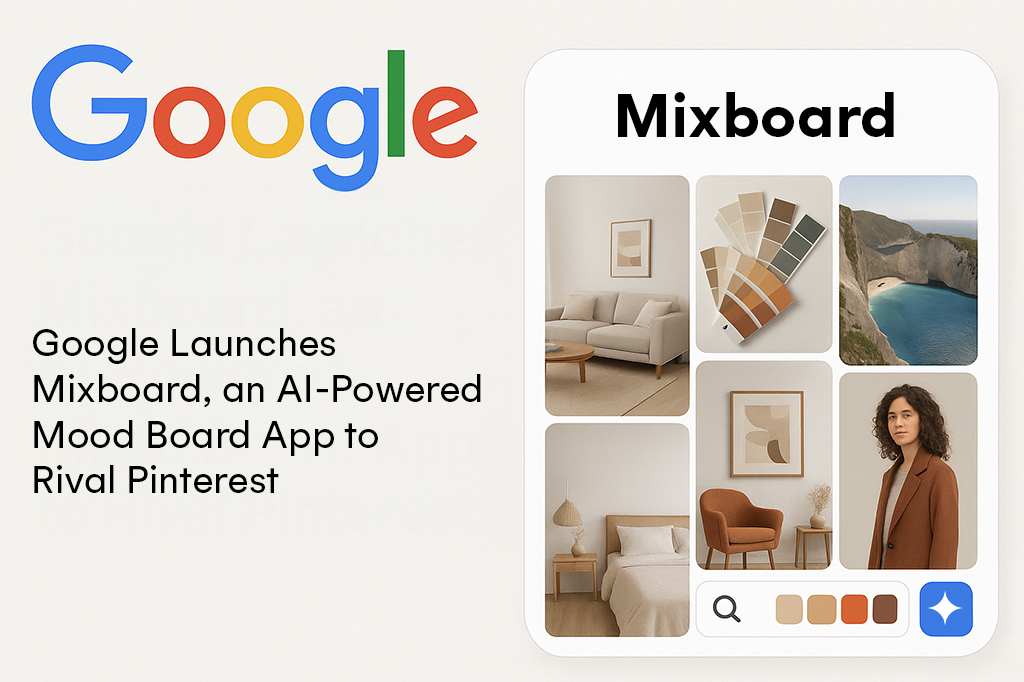
Google has officially unveiled Google Mixboard, an experimental AI app designed to help users turn ideas into visuals. Positioned as a Pinterest rival app, Mixboard combines generative AI with mood board creation, making it one of the most ambitious Google AI apps to enter the creative tools space.
A Fresh Take on MixBoard
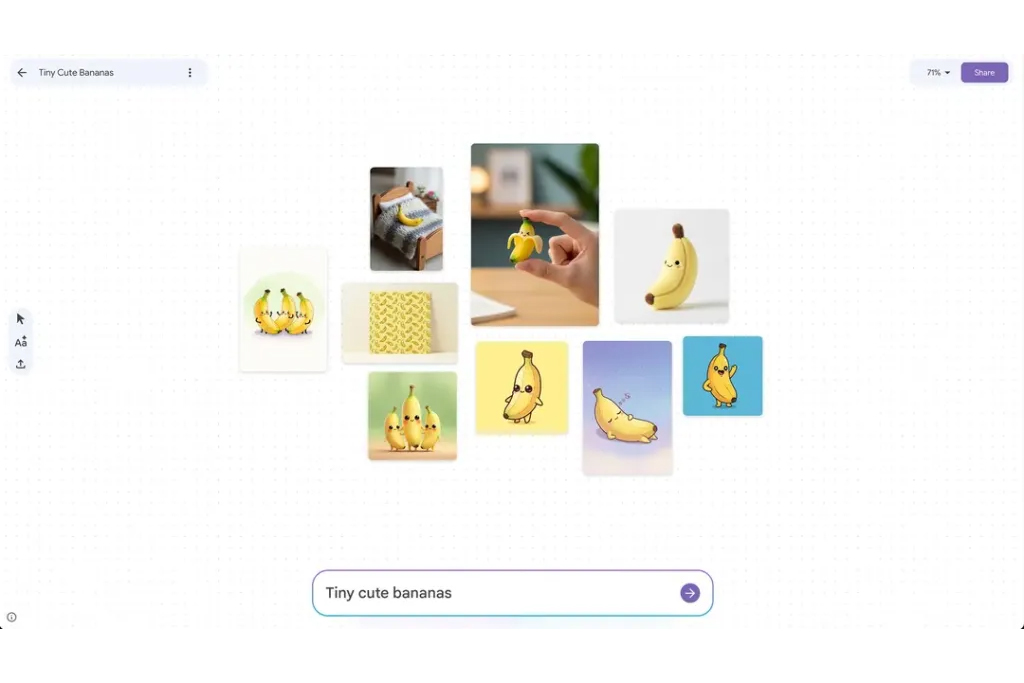
Unlike traditional visual platforms where users collect existing images, Google Mixboard allows people to generate new ones directly from text prompts. Powered by the Nano Banana AI model, the tool can produce images, apply edits, and even create collages with AI. The result is a highly customizable AI mood board app that adapts to user intent rather than relying on pre-existing content.
This approach could transform how designers, marketers, event planners, and hobbyists brainstorm ideas. By starting with just a few words, users can instantly create a visual idea board tailored to their project, whether it’s home décor inspiration, event planning themes, or branding concepts.
More Than Just Pictures
Google Mixboard goes beyond image generation. The app integrates AI content generation tools that automatically create supporting text, such as descriptions, captions, or even pitch notes. This makes it easier for professionals to present polished concepts without switching between multiple platforms.
Google has also included pre-built templates and sample boards for those who need a quick start. These examples serve as both inspiration and a showcase of what the AI design inspiration tool can achieve.
How It Stands Against Pinterest
Pinterest has long been the go-to platform for collecting and sharing visual ideas. However, its model relies on curating existing content. With Google Mixboard, Google aims to leapfrog that limitation by letting users generate unique images from scratch.
This shift positions Google Mixboard not only as a Pinterest rival app but also as part of the broader future of design apps, where generative AI image tools replace manual curation. Early adopters may find that the ability to instantly modify or remix visuals speeds up creative workflows dramatically.
The Role of Google Labs
For now, Google Mixboard is being tested as part of Google Labs beta apps. Like previous experimental launches, this phased rollout gives users a chance to provide feedback before a global release. Google is likely to refine its collage creation with AI capabilities and ensure that the image quality is on par with professional design needs.
Industry watchers say this is another sign of Google’s strategy to bring generative AI into everyday productivity and creative tools, extending far beyond search and productivity software.
The Future of Creative Brainstorming
If Mixboard succeeds, it could redefine how mood boards are used in industries like advertising, interior design, event planning, and fashion. Instead of spending hours searching for images, professionals can let AI handle the heavy lifting, freeing them to focus on the creative brainstorming process.The challenges ahead include maintaining consistency in AI-generated visuals, ensuring ethical image outputs, and competing against entrenched platforms like Pinterest. Yet, with its powerful AI-powered mood board features and deep integration of generative models, Google Mixboard might set a new benchmark in how people turn abstract ideas into visual reality.
Frequently Asked Questions About Google Mixboard
What exactly is Google Mixboard and how is it different from Pinterest?
Google Mixboard is an experimental AI-powered app that lets you create mood boards by generating images from text descriptions rather than collecting existing ones. While Pinterest is all about finding and pinning images that already exist online, Mixboard actually creates brand new visuals based on what you type. So instead of scrolling through thousands of photos hoping to find the right vibe, you just describe what you want and the AI makes it for you.
Do I need design skills to use Mixboard?
Nope! That’s kind of the whole point. You just type what you’re imagining—like “cozy autumn living room with velvet textures” or “futuristic tech startup branding”—and the AI generates visuals for you. There are also pre-built templates if you want a starting point, so you don’t even need to know exactly what you’re looking for when you begin.
What’s the Nano Banana AI model?
Nano Banana is the AI model powering Mixboard’s image generation. It’s what allows the app to turn your text prompts into actual images, edit them, and even create collages. Think of it as the engine under the hood that makes all the creative magic happen.
Can Mixboard write captions and descriptions too, or just make pictures?
Actually, yes! Mixboard includes AI content generation that can create supporting text like descriptions, captions, or even pitch notes alongside your visuals. This is super helpful if you’re putting together a presentation or client proposal and need everything to look polished without jumping between different apps.
Who would actually use something like this?
Loads of people, really. Interior designers planning room makeovers, event planners visualizing wedding themes, marketers brainstorming campaign concepts, fashion designers exploring color palettes, small business owners working on branding—basically anyone who needs to turn abstract ideas into something visual. Even if you’re just redecorating your bedroom, it beats endlessly scrolling through Pinterest.
Is Mixboard available to everyone right now?
Not quite yet. It’s currently in beta testing through Google Labs, which means they’re letting some users try it out first to gather feedback and iron out any issues. Google tends to do this with experimental products before rolling them out to everyone.
Can I edit the images after the AI creates them?
Yes, Mixboard lets you apply edits to the AI-generated images. You can also create collages and remix visuals, which means you’re not stuck with the first version the AI spits out. The idea is to give you flexibility to tweak things until they match your vision.
Will this replace Pinterest entirely?
Probably not replace, but it could definitely shake things up. Pinterest has a massive user base and years of collected content that people love browsing for inspiration. Mixboard is more about creating than discovering. Some people will prefer one approach over the other, and some might use both for different purposes.
What are the downsides or challenges with Mixboard?
The article mentions a few concerns: keeping AI-generated images consistent (so they don’t look wildly different every time), making sure the AI doesn’t create problematic or unethical content, and competing with Pinterest’s established dominance. Plus, like any AI tool, there’s a learning curve in figuring out how to write prompts that get you the results you actually want.
Does this mean Google is getting serious about creative tools?
Seems like it. Mixboard is part of Google’s bigger push to bring generative AI into everyday apps beyond just search and productivity software. They’re clearly testing whether AI-powered creative tools can compete in spaces traditionally dominated by platforms like Pinterest, Canva, and Adobe.
How much does Mixboard cost?
The article doesn’t mention pricing, which makes sense since it’s still in beta. Google often starts with free experimental versions to test interest before deciding on a pricing model. Keep an eye out for official announcements as it moves closer to a public release.
Can I use Mixboard images for commercial projects?
That’s not specified yet, and it’s an important question. Usage rights for AI-generated content can be complicated, so you’ll want to check Google’s terms of service once they’re published. This is something to watch closely if you’re planning to use it for client work or business purposes.